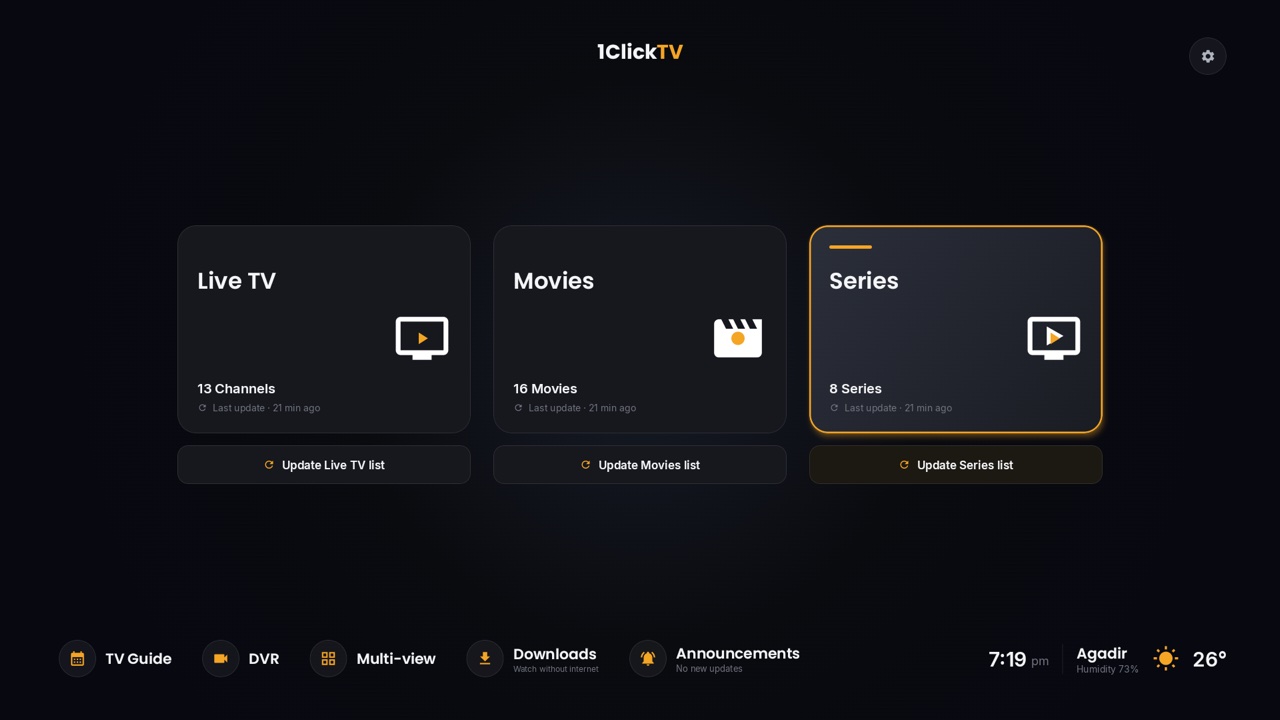
1ClickTV Player is our free IPTV player app for Android devices: Android TV, Google TV, Fire TV, Android TV boxes, phones and tablets. It plays the channels, movies and series from your IPTV subscription, with a proper TV guide, and it includes the features other players keep for a paid upgrade: recording, multi-view, catch-up, profiles and more.
Like every player, it comes without channels. You sign in with your own IPTV provider's details: a 1ClickTV subscription or any other authorized provider.
Why we call it the best IPTV player for Android
- Everything is free. No licence, no subscription, no trial and nothing to unlock. With many popular players, recording and several playlists need a paid Premium version.
- Built for the remote. Fast navigation with the arrow keys, a channel list that shows what's on now, and a live preview while you browse.
- One app for TV, phone and tablet. The same app switches to a touch design on phones and tablets, and can save movies and episodes to watch without internet.
- It keeps itself up to date. When a new version is out, the app downloads it and installs it for you; your playlists, favourites and history stay.
At a glance
| Price | Free: no licence, no subscription, no trial |
|---|---|
| Devices | Android TV, Google TV, Fire TV, Android TV boxes, NVIDIA Shield, Chromecast with Google TV, Android phones and tablets (Android 6 and newer) |
| Sign-in | Xtream Codes login or M3U link, typed on the TV or sent from your phone with a QR code |
| Version | 1.3.22, released 31 October 2026 |
| Coming | LG (webOS) and Samsung (Tizen) TVs soon; Roku and VIDAA planned |
| Download | Downloader code 5012629, or the APK from 1clicktv.net |
What it does
Live TV and the TV guide
Channels are sorted by category, with favourites, recent channels and a live preview. The TV guide shows what's on now and next for every channel. From the guide you can watch, record or set a reminder; when the programme starts, a card pops up so you can switch to it.
Catch-up
On channels where your provider keeps an archive, pick a channel and a day and play any programme from the start, with pause and skip. In the guide, programmes that already aired show Watch catch-up, and the one on now offers Watch from the start. Our guide to IPTV catch-up explains how it works.
Recording
Record what's on now, record a channel, or schedule a recording from the guide. Recordings stop when the programme ends, plus the margin you choose, and you manage them and their storage from the DVR screen.
Multi-view
Watch several channels at once on one screen, laid out in a grid you control with the remote. Handy when more than one game is on.
Movies and series
A poster library with plots and ratings where available, continue watching, progress per episode, and favourites.
Downloads
Save a movie, an episode or a whole season and watch it without internet. Downloads stay inside the app and expire after 7, 30 or 90 days, as you choose.
Profiles and parental controls
Up to six profiles, each with its own favourites and continue watching. Kids profiles show only children's content, and every profile can have a 4-digit PIN.
Your library, your way
Hide countries, categories, channels, movies and series you never watch, put the rest in your own order and rename them. Every change can be undone.
Phone remote and QR sign-in
Scan a QR code on the TV and your phone becomes the remote and the keyboard: type searches and login details on the phone instead of with the remote. The phone and the TV need to be on the same Wi-Fi.
Several providers in one app
Add more than one playlist, switch each on or off, and see them in one library. The guide, multi-view and recordings work across all of them.
Tools for a stable picture
Custom DNS, proxy settings, connection checks and stream retry options help when a connection is unreliable.
How to install it
On Android TV, Google TV and Fire TV
- From your TV's app store, install the free Downloader app (by AFTVnews).
- Allow Downloader to install apps: on Fire TV, go to Settings → My Fire TV → Developer options → Install unknown apps and switch Downloader on. If you don't see Developer options, open About and press OK seven times on your device's name. On Android TV and Google TV, the setting is under Settings → Apps → Security (the wording varies by brand).
- Open Downloader, select the address box and enter 5012629.
- Choose Install, then Open. Delete the installer file when Downloader asks, to save space.
Prefer a direct download? The APK (about 80 MB) is on the 1ClickTV Player download page, with a SHA-256 checksum to confirm the file. Only download it from 1clicktv.net.
On an Android phone or tablet
Open 1clicktv.net in the phone's browser, download the APK, and allow the install when Android asks. The app opens in its touch design by itself.
Which devices can't install it
Amazon's newest sticks, the Fire TV Stick 4K Select and the 2026 Fire TV Stick HD, run Vega OS instead of Android and only accept apps from the Amazon Appstore, so they can't install 1ClickTV Player (or any other app from outside the Appstore). Fire TV models on Fire OS, such as the Fire TV Stick 4K Max, work. On Samsung and LG smart TVs, the 1ClickTV Player app isn't out yet; until then, see our guide to IPTV on Samsung and LG TVs.
Add your IPTV subscription
- Open 1ClickTV Player and choose to add a playlist.
- Pick Xtream Codes and enter the server address, username and password from your provider, or pick M3U and paste your playlist link. Not sure which to use? See M3U playlists explained.
- To type on your phone instead, scan the QR code on the screen.
- The app loads live TV, movies, series and the guide. To change the details later, go to Settings → Playlists, select the playlist and choose Edit login; favourites, recordings and history are kept.
If something doesn't play
Most playback problems come from the provider or the connection rather than the player. Try the same login in another app: if it fails there too, contact your provider. The player shows the code your provider sends back:
| Code | Meaning | What to do |
|---|---|---|
| 451 | Subscription expired | Renew with your provider |
| 407 | This channel's stream is unavailable | Try another channel, or later |
| 458 | Account already in use: your plan's connection limit is reached | Close the app on your other devices or wait 1 to 3 minutes |
For buffering, try the network tools (DNS and stream retries) in the settings, and a network cable instead of Wi-Fi if your device has a port.
Questions people ask
Is 1ClickTV Player free?
Yes. It's free to download and use, with nothing to buy inside the app.
Does it include channels?
No. It's a media player. It plays what your own authorized IPTV provider gives you.
Can I use it with another provider?
Yes. Any authorized provider with an Xtream Codes login or an M3U link works, and you can combine several in one library.
How is it different from TiviMate?
TiviMate is a good player, but recording, several playlists and other extras are part of its paid Premium version, and it's made for TV devices only. 1ClickTV Player includes those features free and also runs on phones and tablets. If you prefer TiviMate, here is how to install and set it up.
Do I need it to watch 1ClickTV?
No. 1ClickTV works in most IPTV players and in the browser with the 1ClickTV web player. 1ClickTV Player is simply the app we recommend on Android devices. See the 1ClickTV plans.